ItemDelegate
Detailed Description
The ItemDelegate class is used to edit text for ListWidget, TableWidget and TreeWidget.
You can call the function edit() to edit an item. It allows the text to be constrained basing on the rules defined by the validator property.
Event
The item data change event is emitted when the editor widget has completed editing the data.
// Listen for the item data change event
itemDelegate.bind('itemDataChanged', (event: ItemDataChangeEvent): void => {
    event.item as ViewItem; // The item being edited.
    event.data; // The data for editing.
});
Example code
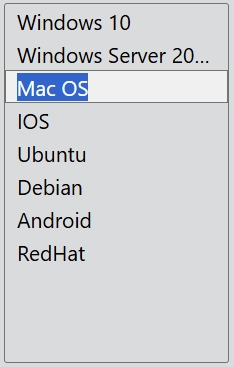
In the code below, you will create an item delegate:
const desktop = Desktop.instance();
const listWidget = new ListWidget(desktop);
const osNames = ['Windows 10', 'Windows Server 2016', 'Mac OS', 'IOS', 'Ubuntu', 'Debian', 'Android', 'RedHat'];
osNames.forEach((name: string): void => {
    listWidget.addItem(name);
});

const itemDelegate = new ItemDelegate;
listWidget.bind('itemClicked', (event: ItemClickEvent): void => {
    itemDelegate.edit(event.item as ViewItem);
});
Customize delegate
If you want to edit an item that pops up in the combobox, you can define a custom class and override the protected functions createEditor() and setItemData().
const osNames = ['Windows 10', 'Windows Server 2016', 'Mac OS', 'IOS', 'Ubuntu', 'Debian', 'Android', 'RedHat'];

class ComboItemDelegate extends AbstractItemDelegate {

    constructor() {
        super();
        this.m_editOnClose = false;
    }

    protected createEditor(item: ViewItem): Widget {
        const editor = new ComboBox(item);
        osNames.forEach((name: string) => {
            editor.add(name);
        });

        editor.text = item.text;
        editor.bind('indexChanged', (event: IndexChangeEvent) => {
            this.setItemData(editor, item);
        });
        return editor;
    }

    protected setItemData(editor: Widget, item: ViewItem): void {
        const comboBox = editor as ComboBox;
        if (item.text !== comboBox.text) {
            item.text = comboBox.text;
            this.emit('itemDataChanged', { item, data: comboBox.text });
        }
    }
}

...
const itemDelegate = new ComboItemDelegate;
...